

Strategy Game App
A mobile strategy game app designed to raise the environmental awareness of the students.

OVERVIEW
Anthropocene is a strategy mobile app designed to use in lectures.
This app is developed for the Climate Change Creative Competition. Each team proposed a product prototype or plan to solve any aspect of climate change within three months.
My team and I wanted to raise awareness of the environment among high school and college students by giving out a new teaching model and app to enhance their willingness to learn.
ROLE
UI Design Lead
User Research, UI Design, Prototype
OTHER INFORMATION
Organizer
Climate Change Creative Competition, Taiwanese Ministry of Education
Team Members
4 members from 3 fields: Forestry, Mechanical, and Library and Information Science
Project Time
4 months (Jan 2018-May 2018)
PROCESS
By following the design thinking process, we aim to put focus on the UNDERSTAND and EXPLORE stage.
UNDERSTAND
EMPHASIZE
User Research
DEFINE
HMW
EXPLORE
IDEATE
PROTOTYPE
Solution
Functional Map
Flow Chart
User Interface
MATERIALZE
TEST
IMPLEMENT
UNDERSTAND THE USER NEEDS
USER RESEARCH
Climate change is truly an issue nowadays. My team wants to solve the problem through the fundamental problem, which is education. In our memories, we seldom have course about environmental education, or most of them are not interested enough for the students to pay attention. Therefore, we wants to find the problem of the lecture and give out a potential solution for this issue.
To understand users' needs, we interviewed ten people and collected 27 responses with the survey. We found that:
78% of people experience watching videos to learn environmental education in school.
57% of people experience taking lectures from teachers and feel bored with the same content.
87% of people would like to take hands-on courses in order to learn more.
PERSONA
Then, we brainstormed about the persona to shape out our user better.

HMW STATEMENT & SOTLUTION INSIGHT
After understanding the pain point, we came out of our problem statement and brainstormed for a solution.
According to the result of the interview, we brainstormed to find out a solution to fit the three aspects:
-
The solution could be executed with hands-on lectures.
-
The solution should catch students' attention.
-
The solution could enable more interaction with the teachers.
After brainstorming for possible solutions, we decided to develop a strategy mobile app, which fits every condition that can be used in lectures to learn through play.
"How might we enable the environmental lecture to become more interesting and more interactive?"
DEFINE THE STURCTURE
FUNCTIONAL MAP

To help figure out the information architecture of the game, we draw both the functional map with a tree structure to see whether we miss any page.
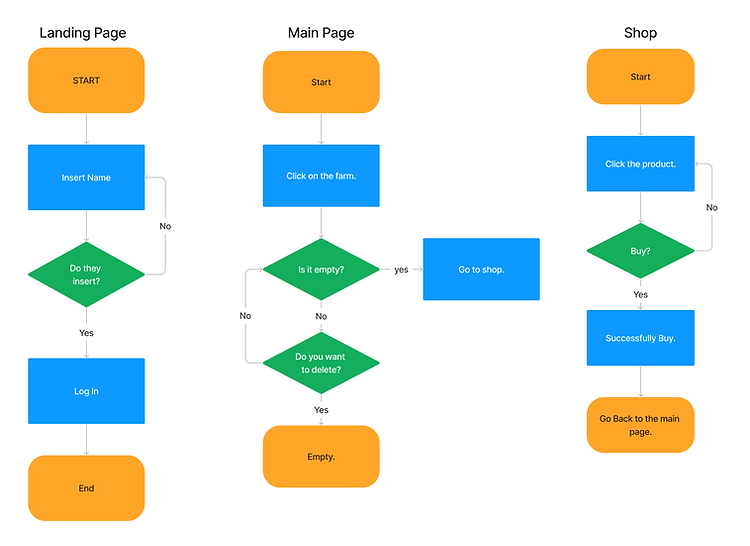
Then, we drew the logic flow of every page to make sure the pages are well-linked.
There are three main pages in the app, which are:
-
Landing Page: Link the application with the lecturer.
-
Main Page: Where all the actions are being done.
-
Shop: Users can see the information on different assets that can be used in the game.
LOGIC FLOW
PROTOTYPE
Here comes the prototype!
Try and play around to see how to interact with the game.
Scroll down to see how we built it 👇👇👇
DESIGN SYSTEM
To provide an energetic and prosperous feel of the game, I choose 5 most common colors from nature. Which are green for plants, brown for dirts, blue for sky and ocean, yellow for sun, and red for flowers. By using those five colors to build out the whole interface to give the whole app a warm, happy, and natural feeling.
I also drew a series of icons that will be used as game elements. They followed the rule of not using more than three colors on each image, so that it won't look too messy or boring in the screen.
Color Palette

Typography

Icon Design

INTERFACE DESIGN
2022 Update:
All interfaces are designed in Mandarine at first. I optimized some interfaces and translated them into English versions to meet future international students' needs.
Now, let's take a closer look of each interface.
-- Poster
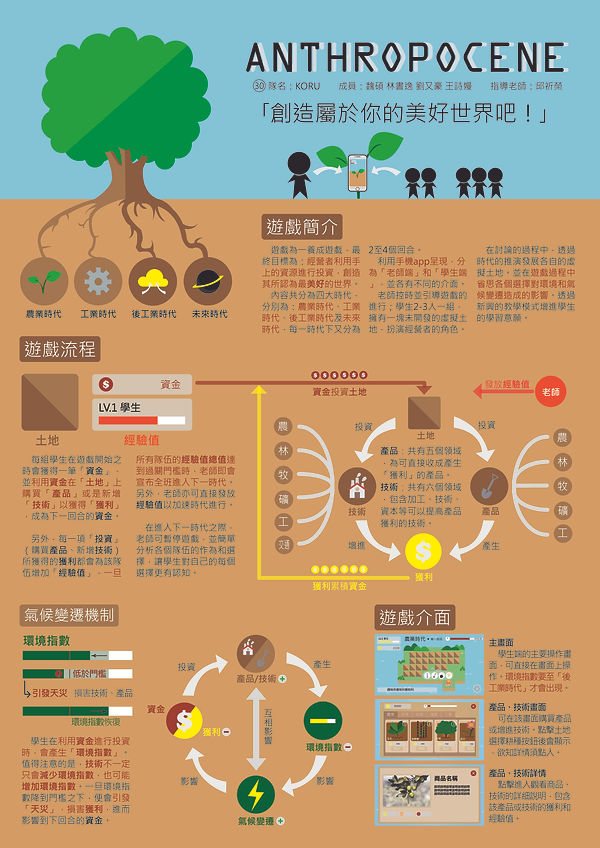
The poster is designed to give an overall instruction to the game.
Student's Interface
-- Game Operation Main Screen
In every terminal, students press on the farmland to decide what should they do now. They have three buttons to choose from: Construct, Destroy or Grow Crops. Once they choose the action, the farmland will be replaced with the capital that they chose.


-- Store Page
Once the student clicks on the action they want to do on the main screen, crops and constructions that they could choose will pop out with instructions. In this way, students may know more about the effect that the crops, housing, and animals will bring to the environment.


-- Climate Changes
The probability of climate change occurs as more capital is constructed on the virtual land. Instructions to those climate changes help the students learn how those natural disasters affect human activities and the environment.


CHALLENGE
Since this was the first time for all members to design and create an app, we faced some problems.
-
How to start? We have no idea how to design the structure of the game.
-
What software should we use to draw the drafts and create the app?
-
How to make sure that the app is available for education use? Are there any regulations?
To solve the problems, we do a lot of self-learning exercises, such as:
-
Referring to similar games. We download a variety of turn-based apps, collect the steps and pages when manipulating it, and list out the flaws of these apps to avoid the same mistakes.
-
Planned the workshop with the mechanical member to learn Unity every week. By attending free online classes, I collected the tips and basic skills for using Unity to create a simple prototype.
-
Self-learned the usage of Adobe Illustrator. Since I have learned Adobe InDesign in the past, I learned another software by watching free videos and books in library to draw the design and elements of the game for my member to imply them in the coding.
-
Collected regulation on the governments' websites to find some regulation and basic rules for designing a teaching material.
RESULT
Participating in the Climate Change Creative Project competition was a momentous event that brought me into UI/UX. After 9 months of working,
🎉We made it into the final round within 150 teams.🎉
Although we did not win an award, our idea has been praised by several judges and give us suggestion to improve in the future.

Thanks to the competition to lead me into the world of UI design. It is our first time to complete an app with cooperation to diverse backgrounds members. I experienced a great time and enjoyed the teamwork with my teammates.
Some key takeaways are that:
-
Cooperation of diverse backgrounds brings different ideas. Grouping up by members from different experiences gives us an overall aspect of the app and covers each other's blind points. I realized that people from technical departments provide logical and practical thinking, while forestry members focus more on the theories and models to predict the effects.
-
The first impression is essential. Since there are about 30 groups in the final round, the first impression is vital to let the judges remember you at first sight. Find out the advantages that help you stand out from the crowds.
-
Always focus on your key goal. As we designed and started prototyping the app, losing focus on a specific purpose was easy. Always stop and review your work to ensure that we are on the right track.


